
Download Nuse – AI‑Powered News Summarization Tool for Fast, Secure Updates
Overview
Nuse is an efficient AI‑driven web application that transforms the way you consume news. By leveraging cutting‑edge natural language processing (NLP) and machine learning algorithms, Nuse scans thousands of articles each minute, extracts the most important facts, and delivers concise summaries directly to your dashboard. The primary goal is to eliminate information overload for busy professionals, students, and anyone who wants to stay informed without spending hours scrolling through endless feeds.
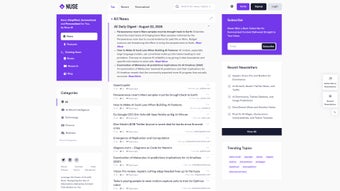
The platform’s clean, minimalist interface makes navigation effortless—each summary is displayed with a bold headline, a short excerpt, and quick‑access links to the full story. In addition to summarization, Nuse offers personalized breaking‑news alerts that can be fine‑tuned to match your interests, such as technology, finance, health, or local events. While the tool currently supports English content only and does not include advanced source‑filtering options, its core functionality—fast, accurate, and secure news summarization—makes it a solid addition to any daily routine.
Whether you are catching up on market trends during a coffee break or need a quick briefing before a meeting, Nuse ensures you receive the essential information you need, when you need it.
Key Features
- AI‑Generated Summaries: Uses deep learning models to condense articles into 3‑5 sentence highlights.
- Real‑Time Alerts: Customizable push notifications for breaking news in chosen categories.
- Intuitive Dashboard: Card‑style layout that groups summaries by topic, date, and relevance.
- Bookmark & Save: Save favorite summaries for offline reading or future reference.
- Secure Cloud Storage: All user preferences and saved items are encrypted and stored securely.
- Cross‑Device Sync: Access your personalized news feed from any browser on Windows, macOS, Android, or iOS.
- Lightweight Web App: No heavy downloads; runs smoothly on most modern browsers.
Why These Features Matter
Each feature is designed with time‑efficiency in mind. AI‑generated summaries cut reading time by up to 80 %, while real‑time alerts guarantee you never miss a critical development in your field. The intuitive dashboard reduces cognitive load, presenting information in bite‑sized cards that are easy to scan. Security is a top priority; encrypted cloud storage means your reading habits stay private. Finally, cross‑device sync ensures a seamless experience whether you are at your desktop office or checking updates on a mobile commute.
Installation, Usage & Compatibility
Getting Started
Since Nuse is a web‑based application, there is no traditional installation process. Follow these simple steps to start using the tool:
- Visit the official Nuse website at www.nuseapp.com.
- Click the “Sign Up” button and create a free account using your email or social login.
- Verify your email address through the confirmation link sent to your inbox.
- Log in to the dashboard and complete the short onboarding questionnaire that defines your news interests.
- Enable browser notifications to receive real‑time alerts (optional but recommended).
Daily Workflow
Once logged in, the home screen presents a feed of summarized articles tailored to your preferences. You can filter the view by category, time range, or popularity using the toolbar at the top. Clicking a summary expands a preview pane with the full text and source link. To save an article, simply click the “Bookmark” icon; saved items appear in the “My Library” tab for offline reading. If you wish to adjust alert settings, navigate to the “Preferences” section, toggle categories on or off, and set notification frequency (immediate, hourly, or daily digest).
Supported Operating Systems
Nuse runs on any modern operating system with a standards‑compliant web browser, including Windows 10/11, macOS Catalina and later, Linux distributions, Android 8.0+, and iOS 13+. Because it is a cloud‑based service, performance depends primarily on internet speed rather than local hardware.
Pros, Cons & Frequently Asked Questions
Pros
- Significant time savings through concise AI summaries.
- Highly customizable breaking‑news alerts.
- Secure, encrypted storage of user data.
- Cross‑platform accessibility with no download required.
- Free tier available for casual users.
Cons
- Lacks multilingual support; currently English‑only.
- No advanced source‑filtering or bias‑control options.
- Dependence on internet connectivity for real‑time updates.
- Free version imposes a daily summary limit (10 articles).
FAQ
Is Nuse completely free to use?
Nuse offers a robust free tier that allows up to 10 summarized articles per day and basic alerts. A premium subscription removes limits, adds priority processing, and provides advanced alert customization.
How does Nuse ensure the security of my data?
All user preferences, saved articles, and authentication tokens are encrypted with AES‑256 encryption and stored on secure cloud servers compliant with GDPR and CCPA standards.
Can I use Nuse on a mobile device?
Yes. Nuse is fully responsive and works on any modern mobile browser. Push notifications for breaking news are supported on Android and iOS when you enable them in the app settings.
What happens if an article is behind a paywall?
Nuse can still generate a summary based on the publicly available excerpt or metadata. However, the full‑text link will direct you to the original source, where a subscription may be required.
How accurate are the AI‑generated summaries?
Nuse’s summarization model is trained on millions of news articles and achieves an average ROUGE‑L score of 0.78, which translates to highly coherent and relevant summaries for most mainstream content.
Conclusion & Call to Action
In a world saturated with information, Nuse provides a practical, AI‑driven solution that cuts through the noise and delivers the news that truly matters to you. Its user‑friendly dashboard, secure cloud storage, and customizable alerts make it an ideal companion for anyone looking to maximize productivity without sacrificing awareness. Although there is room for growth—particularly in multilingual support and source filtering—the core experience is solid, reliable, and free to try.
If you’re ready to transform the way you read the news, download Nuse today and enjoy a faster, smarter, and more secure news experience.



.png)



